
本页面介绍了如何为以太网功能启用 MACsec。
使用 MACsec 对车载信息娱乐系统 (IVI) 用于不同 ECU 单元的以太网通信进行身份验证和加密,以保护数据免遭篡改、重放或信息泄露。为此,请为以太网启用 MACsec IEEE 802.11AE 网络。
概览
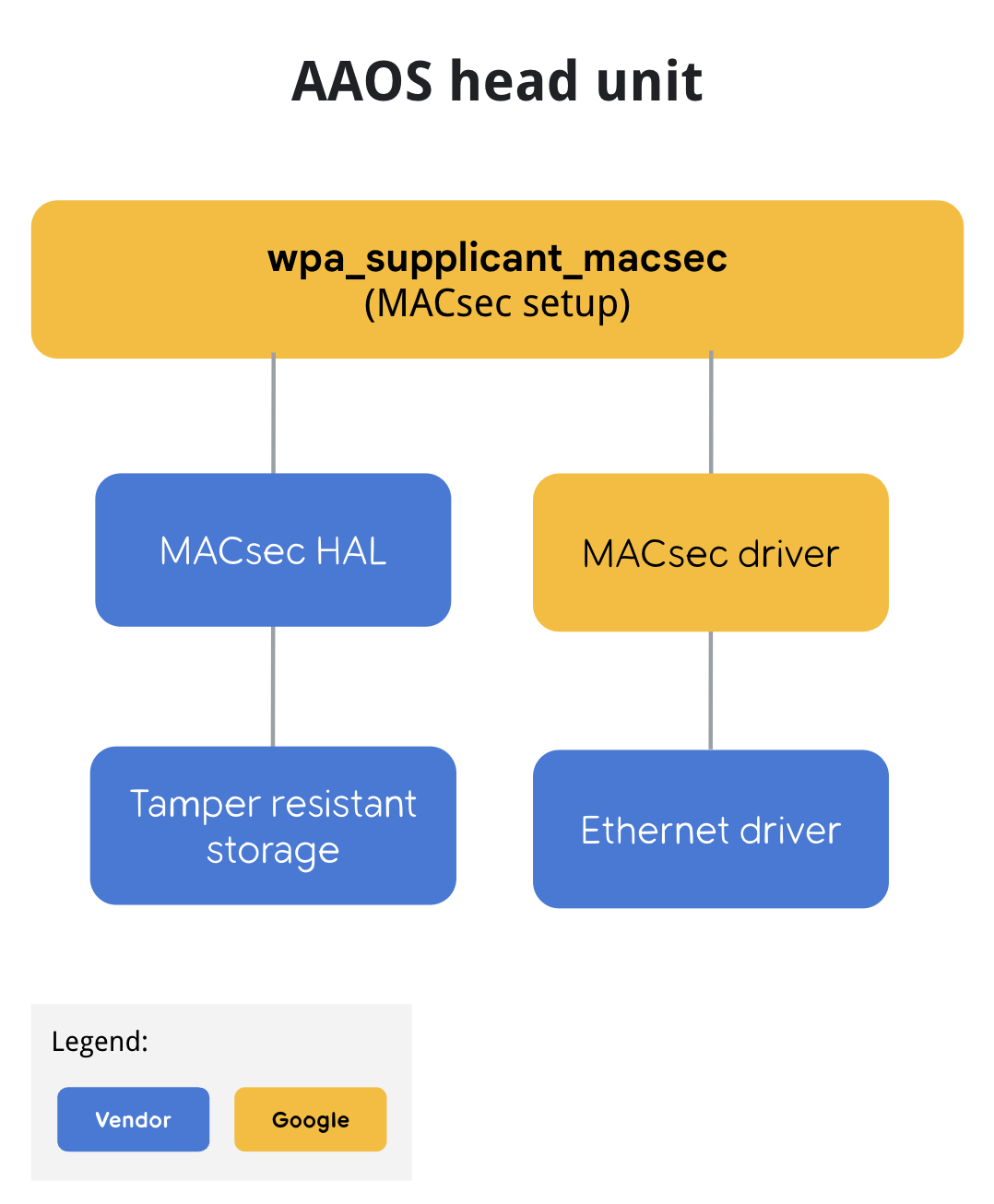
要启用 MACsec,wpa_supplicant 用作处理 MACsec 密钥协商 (MKA) 握手的守护进程。定义了 MACsec HAL 以安全地存储 MACsec 预共享密钥,称为连接关联密钥 (CAK)。MACsec HAL 仅支持 CAK。此供应商特定的 MACsec HAL 将 CAK 安全地存储在防篡改存储中。密钥的配置取决于供应商的实现。
MACsec 流程
图 1 说明了 Head Unit 上的 MACsec 流程。
启用 MACsec
要为使用 MACsec CAK 密钥的功能提供支持,必须使用供应商特定的 MACsec HAL 显式启用以太网的 MACsec。
要启用该功能,请启用 wpa_supplicant_macsec 和供应商特定的 macsec-service 到 PRODUCT_PACKAGES,并将 wpa_supplicant_macsec 的配置文件 init rc 脚本添加到 PRODUCT_COPY_FILES。
例如,此 [device-product].mk 文件
# MACSEC HAL

# This is a mock MACsec HAL implementation with keys embedded in it. Replace with vendor specific HAL
PRODUCT_PACKAGES += android.hardware.automotive.macsec-service

# wpa_supplicant build with MACsec support

PRODUCT_PACKAGES += wpa_supplicant_macsec

# configuration file for wpa_supplicant with MACsec

PRODUCT_COPY_FILES += \
    $(LOCAL_PATH)/wpa_supplicant_macsec.conf:$(TARGET_COPY_OUT_VENDOR)/etc/wpa_supplicant_macsec.conf \
    $(LOCAL_PATH)/wpa_supplicant_macsec.rc:$(TARGET_COPY_OUT_VENDOR)/etc/init/wpa_supplicant_macsec.rc
例如,wpa_supplicant_macsec.conf。
# wpa_supplicant_macsec.conf
eapol_version=3
ap_scan=0
fast_reauth=1
# Example configuration for MACsec with preshared key
# mka_cak is not actual key but index for MACsec HAL to specify which key to use
# and make_cak must be either 16 digits or 32 digits depends the actually CAK key length.
network={
        key_mgmt=NONE
        eapol_flags=0
        macsec_policy=1
        macsec_replay_protect=1
        macsec_replay_window=0
        mka_cak=00000000000000000000000000000001
        mka_ckn=31323334
        mka_priority=128
}
eth0 上的示例 wpa_supplicant_macsec.conf。当多个网络接口需要受到 MACsec 保护时,您可以启动多个服务。
# wpa_supplicant_macsec.rc
service wpa_supplicant_macsec /vendor/bin/hw/wpa_supplicant_macsec \
        -dd -i eth0 -Dmacsec_linux -c /vendor/etc/wpa_supplicant_macsec.conf
        oneshot
在以太网接口就绪后启动 wpa_supplicant_macsec。如果系统以太网未就绪,wpa_supplicant 会立即返回错误。为避免竞争条件,可能需要等待(默认超时时间为五 (5) 秒)/sys//class/net/${eth_interface}。
# init.target.rc
on late-fs
    …
    wait /sys/class/net/eth0
    start wpa_supplicant_macsec
    …
配置 MACsec 接口的 IP 地址
MACsec 接口 IP 地址的配置可以由系统连接管理器在 zygote 启动后完成。以下是连接的示例叠加 XML 文件。如果需要在 zygote 启动之前准备好 MACsec 接口的 IP 地址,则供应商特定的守护进程需要监听 macsec0 接口并对其进行配置,因为系统连接管理器仅在 zygote 启动后才启动。
# Example of com.google.android.connectivity.resources overlay config
<?xml version="1.0" encoding="utf-8"?>
<!-- Resources to configure the connectivity module based on each OEM's preference. -->
<resources xmlns:xliff="urn:oasis:names:tc:xliff:document:1.2">
    <!-- Whether the internal vehicle network should remain active even when no
         apps requested it. -->
    <bool name="config_vehicleInternalNetworkAlwaysRequested">true</bool>
    <string-array translatable="false" name="config_ethernet_interfaces">
        <!-- Not metered, trusted, not vpn, vehicle, not vcn managed, restricted -->
        <item>macsec0;11,14,15,27,28;ip=10.10.10.2/24 gateway=10.10.10.1 dns=4.4.4.4,8.8.8.8</item>
    </string-array>
    <string translatable="false" name="config_ethernet_iface_regex">macsec\\d</string>
</resources>
MACsec HAL
MACsec 供应商特定的 HAL 必须实现以下功能以保护 CAK 密钥。所有使用密钥的加密和解密都直接完成,而不会将密钥暴露给 wpa_supplicant。
/**
 * MACSEC pre-shared key plugin for wpa_applicant
 *
 * The goal of this service is to provide function for using the MACSEC CAK
 *
 */
@VintfStability
interface IMacsecPSKPlugin {
    /**
     * For xTS test only, not called in production
     *
     * @param keyId is key id to add
     * @param CAK, CAK key to set
     * @param CKN, CKN to set
     *
     * @return ICV.
     */
    void addTestKey(in byte[] keyId, in byte[] CAK, in byte[] CKN);


    /**
     * Use ICV key do AES CMAC same as ieee802_1x_icv_aes_cmac in wpa_supplicant
     *
     * @param keyId is key id to be used for AES CMAC
     * @param data
     *
     * @return ICV.
     */
    byte[] calcICV(in byte[] keyId, in byte[] data);


    /**
     * KDF with CAK key to generate SAK key same as ieee802_1x_sak_aes_cmac in wpa_supplicant
     *
     * @param keyId is key id to be used for KDF
     * @param seed is key seed (random number)
     * @param sakLength generated SAK length (16 or 32)
     *
     * @return SAK key.
     */
    byte[] generateSAK(in byte[] keyId, in byte[] data, in int sakLength);


    /**
     * Encrypt using KEK key, this is same as aes_wrap with kek.key in wpa_supplicant
     * which used to wrap a SAK key
     *
     * @param keyId is key id to be used for encryption
     * @param sak is SAK key (16 or 32 bytes) to be wrapped.
     *
     * @return wrapped data using KEK key.
     */
    byte[] wrapSAK(in byte[] keyId, in byte[] sak);


    /**
     * Decrypt using KEK key, this is same as aes_unwrap with kek.key in wpa_supplicant
     * which used to unwrap a SAK key
     *
     * @param keyId is key id to be used for decryption
     * @param sak is wrapped SAK key.
     *
     * @return unwrapped data using KEK key.
     */
    byte[] unwrapSAK(in byte[] keyId, in byte[] sak);
}
参考实现
参考实现是在 hardware/interfaces/macsec/aidl/default 中提供的,它提供了带有嵌入密钥的 HAL 的软件实现。由于密钥不受防篡改存储的支持,因此此实现仅提供 HAL 的功能参考。
测试 MACsec HAL
MACsec HAL 测试在 hardware/interfaces/automotive/macsec/aidl/vts/functional 中提供。
要运行测试
$ atest VtsHalMacsecPskPluginV1Test
这会调用 addTestKey-- 以将测试密钥插入到 HAL 中,并根据 calcIcv、generateSak、wrapSak 和 unwrapSak 的预期值进行验证。
要确认 MACsec 正在工作,对于集成测试,请在 MACsec 接口中的两台机器之间执行 ping 操作
# ping -I macsec0 10.10.10.1
要使用主机测试 Cuttlefish,需要在主机中 echo 8 > /sys/devices/virtual/net/cvd-ebr/bridge/group_fwd_mask,以允许传递 MACsec 所需的 LLDP 帧。